

First there was the Animal Crossing Calculator and now Nintendo brings us the Mario Calculator for fans of the famous Italian plumber. While the functionality of the actual application is basically identical to that of the Animal Crossing Calculator (well duh, it's a calculator!), the Mario theme does seem to have a wider appeal with game fans, and it also has a bit more personality and charm to it. But is this enough to make this simple application worthy of your Nintendo Points or just another attempt to cash in on the popularity of the long-running franchise?
The first part of this application is the standard calculator function. You won't find a lot of bells & whistles with this program, as it's basically just a standard calculator complete with addition, subtraction, multiplication, and division functions. There's also a percentage button as well as the standard set of memory keys.
You use the touchscreen of the DSi to input your numerical figures and this is also where you'll find all of the calculator's functions as well. The top screen displays the readout along with a complete history of all figures you've inputted. You can even scroll through the history to see previous entries if need be. Above that you'll find a display of the current contents of the calculator's memory function that can be viewed anytime you make use of it.
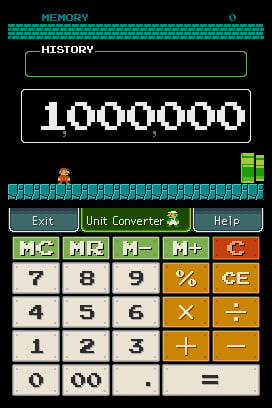
Of course the top screen is also where you'll find the Super Mario theme that includes the standard Super Mario Bros. underground scene complete with blue bricks. Each time you perform a calculation, Mario will jump up and bump a coin. You'll even get the traditional Super Mario Bros. sound effects thrown in for good measure. And if you find this simple calculation experience a bit boring, you can even move Mario back and forth jumping to your heart's content.
Next up is the Unit Conversion, which is easily the application's most useful feature. You can either guide Mario into the pipe on the right side of the screen, or tap the UNIT CONVERSION tab on the touchscreen. It's here that you can convert any number of various measurements using both metric and standard units. There are tabs for Length, Weight, Volume, Time, Area, Speed, Temperature, and Age. You basically input the numerical figure, click the tab of the unit you're starting with and then click on the tab of the unit you wish to convert to. You'll get your answer displayed on the top screen complete with the trademark Super Mario Bros. coin ringing presentation. It's that simple.
Conclusion
The Mario theme is obviously going to make this appealing to some, but much like the Animal Crossing Calculator application, it's still just a simple calculator, something than can already be found on almost any electronic device in existence today. Unless you just can't pass up the Mario theme, you might want to save those Nintendo Points for something a bit more worthwhile. You never know when Nintendo might release that Mario egg timer.


Comments 20
I'd buy it just for the sound effects lol.
This actually doesn't sound too bad, especially with the unit conversion feature, which most calculators simply don't have. Might download it at some point, as much as that statement surprises even ME!
Age converter?
...but still, I can do enough of that in Pokémon Platinum!
They need to make the calculators scientific calculators at least to make them at all useful, but then again, most people probably have a scientific calulator.
@MarkyVigoroth
I think the age converter is for things like people to dog years and the like.
Poor Corbie, he had to review both of the calculators.
I wont spend any dollars on Nintendo this week.
Might get.............
Could not pass up the Mario theme.
Incapable.
Why download a calculator when you can use a cell phone that already has one?
I wouldn't even give this a 5. This is just the crap that really ticks me off with Nintendo. Why the crap do we not have a actaul DSi download of a Mario sidescroller with actual gameplay. Yeah Im cool with Mario vs DK but come on.
Nice review, Corbie!
Doesn't look that awesome, though. Probably won't get it when I get a DSi. (And don't hate me for not having one yet. I'm 11 and I don't get allowence.)
@jhuhn: Well, not all of us have cell phones, believe it or not. Sadly, I do not have, and never have had, a cell phone.
I keep losing my calculator in my room, and I have some odd Nintendo Points left on my DSi, so I've decided to download this. Should come in handy, methinks.
can someone give me 100 points to buy this like i said in this forum please
looks cool
The Clock is better.Whoever reviewed the clock needs to re review it.Afterall you can use your own sound files as the Alarm Sound but this is just a normal looking Calculator with a mario theme.I'd have to give this one some thought.
I think something like this should be on the FREE section.
lockd- this is way better than the clock. my brother got the clock and i got the calculator and the clock wasnt too great lol. this is good to do your math homework and stuff like that. lol
I don't see the point of buying a calculator for your handheld. First of all, it has to load up for a few seconds, about 15-20. Even if it is a Mario Style, I never use it.
Kind of a waste of money, because you could easily just pick up an actual calculator if you needed it, or even from your laptop, phone, or any other handheld without having to start up an application.
This is the kind of stuff that should be free.
I was playing with the calculator one day, and I typed in 987+0, a Toad and fireworks appeared. I typed in 654+0 and that happened again, and then 321 and they appeared again. However, they only appeared when I typed in those problems. Does anyone know why?
@ryanthehedgehog: Actually, I have this, and it only takes about 3 seconds to load.
Tap here to load 20 comments
Leave A Comment
Hold on there, you need to login to post a comment...